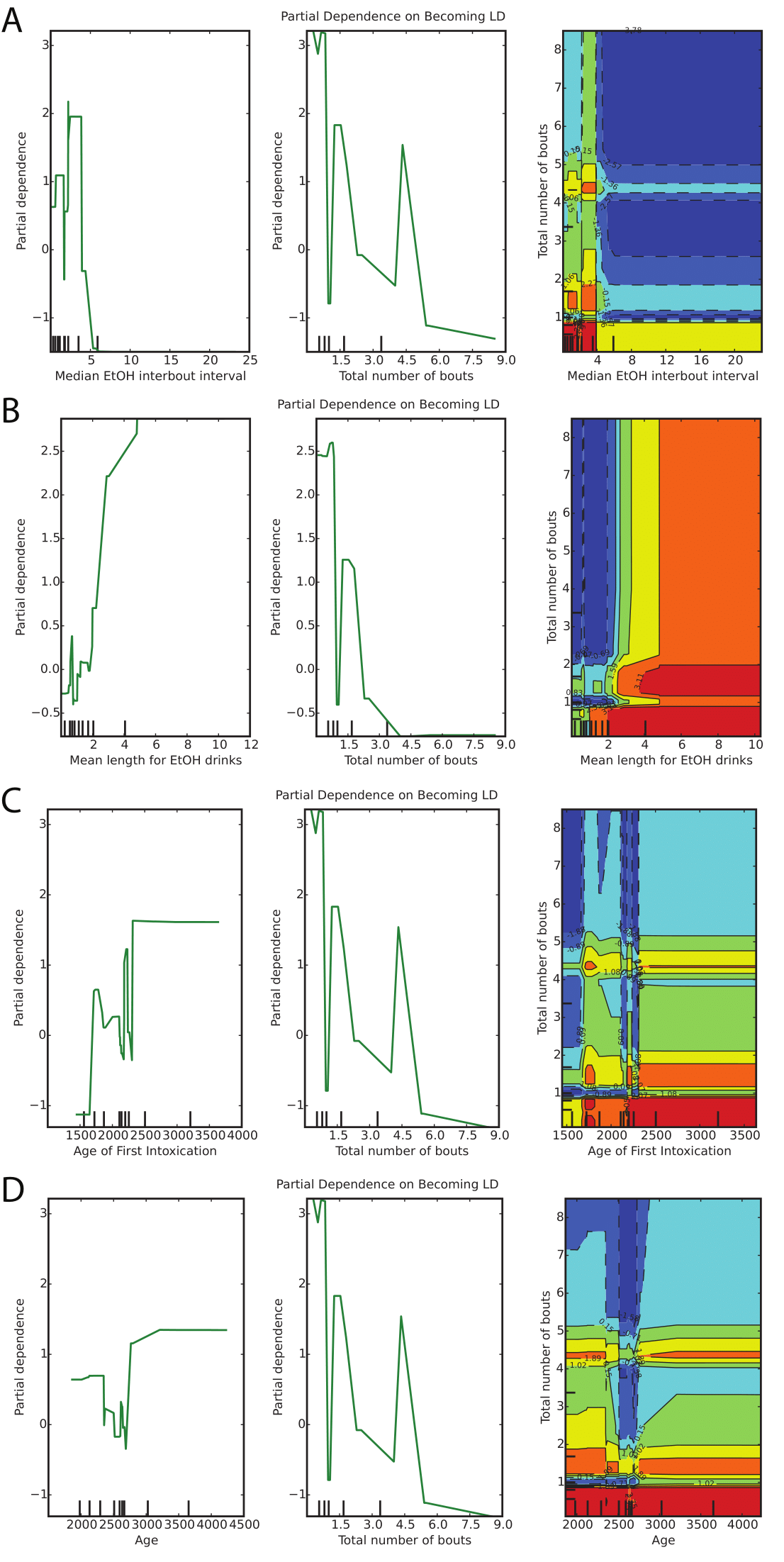
Below is my first real paper in English: a master’s project write-up at ECS, Baylor University. Acedemic writing, surprisingly, proved to be easier (for non-native) than publicistic style: we want to use short, precise and concise words (which are easier to know since they mostly universal due to the Latin roots) with simple sentence structure, and generally avoid very long complicated sentences like this one, which is so prone to ample mistakes. Anyways, here is an abstract for the PDF attached (click on the image):
The Monkey Alcohol and Tissue Research Resource (MATRR) is a rich data repository containing heterogeneous experimental data derived from well-documented non-human primate alcohol self-administration studies. This macaque model has demonstrated categorical drinking norms reflective of human drinking populations. By thorough analysis of the available data we are able to better understand the causative agents, progression and features of alcoholism.
This project presents investigation results separated into two sections: the first describes the rapid discovery and testing of new hypothesis; the second describes the detailed study of predicting future levels of alcoholism based on early (induction) drinking and behavioral data using machine learning techniques. Each study takes advantage of a different set of tools and traces their effectiveness, validity and limitations when describing data in meaningful visual form. We also explore the assignment and cross-examination of data from different sources, and how they aid in generating hypothesis and observing gender and drinking category differences.
Most often use case when working with the data via Django ORM is simly run some query and print out everything from the output. Doing so directly renders unreadable one-liner:
Much better! Each model has modelName._meta.fields which returns list of fields in the same order as values_list(). Those fields however are in app.model.field format, hence splitting by dot and getting the last item.
And you can also just put a static method that prints the entire content without filtering:
@staticmethoddefcontent_print():printpd.DataFrame(list(MonkeyBEC.objects.all().values_list()),columns=[str(x).split('.')[2]forxinMonkeyBEC._meta.fields])# Now this does the job:
MonkeyBEC.content_print()
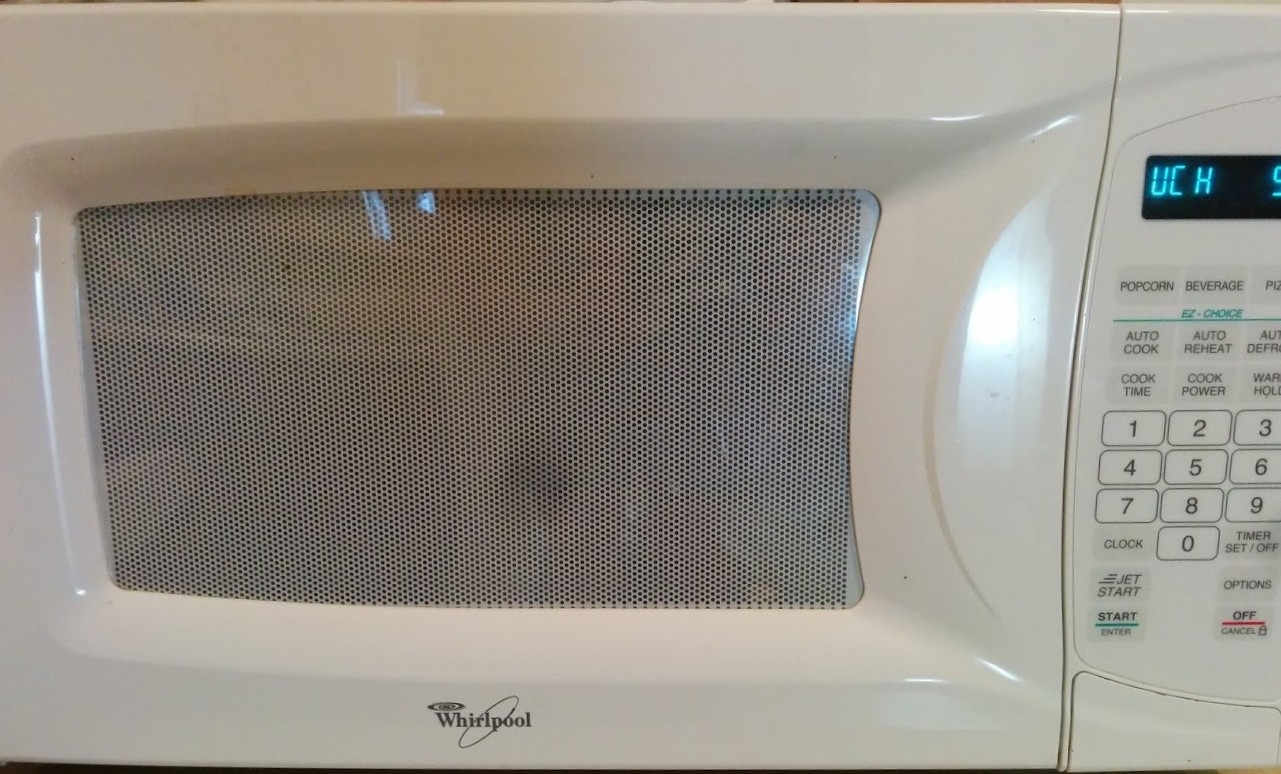
When I earn enough money I plan to embark on the journey of designing better things. It is mysteriously surprising why everyday things around us are designed, often, so poorly. Stave Jobs was obsessed with usability, simplicity and cleanness of the design in his products. Google has been producing top notch design for its products recently. Why then manufacturers of the everyday things do not seem to care about that at all? As an example, let’s consider the microwave from my apartment:
Looks typical? Sadly, yes. Here is why this design is sad:
Running line on the display is ridiculously annoying. In general, running lines should be avoided everywhere because they distract us, and it is hard to read the information anyways. You can always shorten the words or better not use them at all: make it self evident. In this case, microwave provides very valueable info: touch start to… In general, we always try to desing buttons in such a way that it would be obvious to anyone that they should be pressed or touched. In this case buttons look ok, so no need for redundant info, which by the way never goes away, it keeps running until the next use, which distracts me even from my bed in another room if the door is not completely shut. Thus this microwave shows redundant info 90% of the time, rather than showing oh, well, time?
According to my observations, 95% of the time people don’t want from the microwave anything fancy. They just want to start it, say for 30 seconds. How to start? In my previous apartment that would happen when you press green colored “start” button. It took us almost a year to realize that this microwave has a jet start button which does exactly that. Why designating a separate button to something that could be done by another button?
Actually, this argument extends to all the buttons. Why we need so many of them? What are the core functionality of the device? It’s to heat up. By far, most of the times we simply need to start/stop the microwave, but we have this abundance of buttons of equal size which initate actions of different importance.
Nine buttons are used as a keypad for setting time of heating. How many of us need it very precies? Do we care if its 40 or 42 seconds? No. Thus keypad is a waste, simple control knob will do the job much better.
The last one is arguably the most annoying feature ever: once time is up, the microwave will start triple beep once in 30 seconds. It will continue to do it… forever, I kid you not! Nothing should go on forever, why not make a switch back to normal after several minutes?
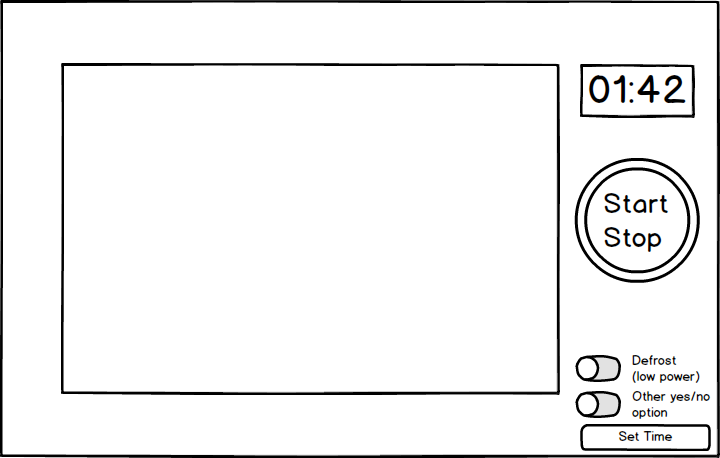
Based on all the observations above I made a sketch of my microwave prototype. I’d call it ‘Simple’ or ‘Go’:
Several important details which are not clear from the picture:
Diplay always shows 4 digits in ‘mm:ss’ format.
Simple control knob is used to change the numbers; pressing it starts the device, if idle or stops, if active.
Secondary switches are small and located separately. Simple button + indicator (on/off) could be used to emulate physical switch.
Set time button temporarily (5 sec?) allows to use the control knob to adjust time.
Once inactive (1 min timout?) display starts displaying clock time instead of cooking time.
Cooking time is never reset, we just use control knob to add or substract time.
This control knob should be smart too: the faster and longer you spin - the more are the chunks of the time increase.
Thus by determining and separating the core functionality of the microwave and by optimizing the control tools we created intuitive and easy-to-use device.
Making the first impression is very important for your service, and login/register form is typically the first thing user will see, which renders it important to invest and design it right.
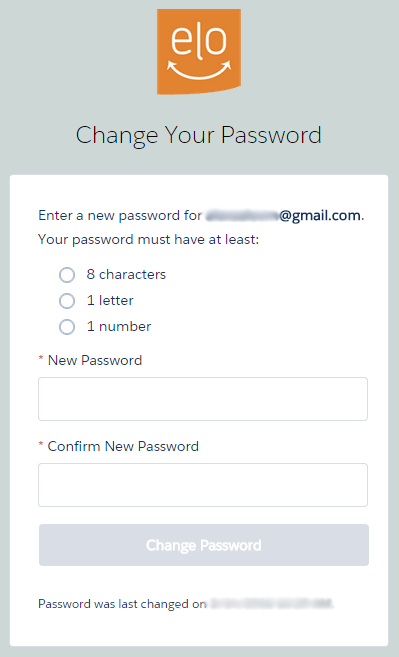
There are abundance of utterly horrible designs out there, but today, I want to criticize a relatively good one:
First thing first: 10 chars is not enough for the password if you really care, and if you don’t - why bother with special chars? Oops, I misread the info: the length is actually 8 chars, and must contain at least one letter and one number. Here is the clue: it should be nearly impossible to misread your design - be clear and precise, test it on people! Now, 8 chars is not very secure at all - breakable by brute force. Yet they ask for at least one number (normally other services in USA ask for other garbage as well). As every school kid knows: adding a several char options into domain space do not increase the secureness of the password - machine really doesn’t care which chars you use.
So far we have a weak password with the number which makes it harder to remember (than secure long paraphrase).
Do three checkbox requirements look like you could/should click on them? To me - absolutely. But they are not. Why would you do that to your valuable user?
Now why you want me to confirm my new password? Since long we agreed that the chance of such event (you mistype your password) are relatively low, hence you should be trusted with one attempt only, and in case of unlikely event - you just rest the pass again - sure you can since you got here in the first place.
Again, this design is very nice compare to what is typically out there, yet it could be improved. Please design nice things!
How do spammers learn our email addresses? Well, it’s possible to buy them (in huge bunches, of course) from various sellers. Seller could be not-so-honest-web-site, that just sells its customer base, or someone, who crawled a part of the web (in which you are present) and parsed your email address.
Anytime, we put our email address or cellphone number on the static web page - we just leave it out there to be parsed and sold to the spammers. Below are some more or less efficient ways to display yet not compromise your email address or cellphone number. Then, we’ll try to outsmart that protection.
By the way, have you noticed that in AirBnB you can’t send you cell number to the potential host? Otherwise, you could have skipped the middleman (airbnb) and arranged the bed with the owner directly. AirBnB doesn’t want that and detects any of your attempts to send a number or email address via direct messaging (before you paid for the night). My ‘nine-zero-eight-…’ was not sophisticated enough to trick the system when were stuck in Paris…
Concealing Email Address from Parsing
Here are some common methods to conceal email address:
Using uppercase: name@mail.COM - pretty inefficient and ugly looking
Insert some repeated symbol: a-l-e-x-@-m-a-i-l-.-c-o-m - ugly
Playing with ‘@’ symbol:
substitute as at or (at): name(at)mail.com - kind of easy, though looks ok
use Unicode sequence |& #x40 ; which renders @ - efficient and cool
Playing with ‘.’ symbol:
dot, dom, dt: name@mail dt com - pretty lame though efficient if used not trivially
using other special char: name@ecs;stanford;com
simply space: name @ ecs mail com - this is surprisingly tricky to parse, but easy to understand
Use word construct: teresa (followed by “@stanford.edu”) - hard to parse
These are the common tricks, out of which I’d recommend to go with simple spaces with changing @:
alex at cs baylor edu
Now, all of the above still sort of parsable. To make it really hard, we can write small js script to print the email address: obfuscate(name, domain) in html -> renders name@domain.com in the browser. Since parser works with html it would not have pieces together. Try wget this page and parse this address:
Here is the script, which was copied from Dan Jurafsky Stanford’s web page:
Alternatively, one can simply use a picture with the email address, which is impossible to parse automatically (well it’s possible, but you don’t know which picture, and if you checked manually - you would not have needed the parser anyways).
Parsing Email Address
Now what if we interested to parse email addresses for some good reasons? There is surely endless room for improvement, but here is what I have (using python’s re):
importre# () capture group - will be returned in the tuple
# (?:) non capture group
# login could be any chars, digit or dot; at least one symbol
login='([a-z0-9_\.]+)'# at could be written as a word 'at', symbol '@' or unicode symbol '@'
# and potentially surrounded by parethsesis or spaces
at='(?:\s?\(?(?:@|\sat\s|@|where)\)?\s?)'# dots in domain are usually masked
dots=['dot','dom','dt',';','\.','\s',' ']# and potentially surrounded by spaces
# use badass python way to concat list elems with custom sep: sep.join(list)
dot='(?:\s?(?:'+'|'.join(dots)+')\s?)'# domain is (name + dot) one or more times
domain='((?:[a-z0-9_]+'+dot+'){1,3})'# zone
zone='(edu|com)'email_pattern=login+at+domain+zonedefprint_email(email_line):# lowercase and remove obfuscating symbols
email_line=email_line.lower().replace('-','')# match regexp
matches=re.findall(email_pattern,email_line,re.IGNORECASE)# python re returns list of tuples with the number of capture groups
forlogin,domain,zoneinmatches:fordotindots:# convert each trick dot into real dot
domain=domain.replace(dot,'.')# some spaces turned into extra dots, compress dots
domain=domain.replace('..','.').replace('..','.')# print email in proper way
email='%s@%s%s'%(login,domain,zone)printemailprint_email('alex at ecs mail com')# alex@ecs.mail.com